
Turn your states into a Statement!
Most GameMaker projects start with a humble little state variable.
And then, slowly, you add a few flags. Then a switch. Then a second switch “just for the special case”. And by the end you have a two-storey high switch block full of special edge cases and workarounds, and now you’ve got a bug that only appears when you roll into a ladder on Tuesday with 22.5% health exactly and you have to try to disentangle the frankenstein’d code…
Yeah, that’s what Statement is here to help with.
Statement is a lightweight but feature rich state machine framework for GameMaker that replaces that mess with something you can actually read.
You give an object (or a struct) a state machine, define a handful of named states, and let Statement handle the boring parts: lifecycle, timing, transitions, history, stacks, and a bunch of optional power tools when you want them.
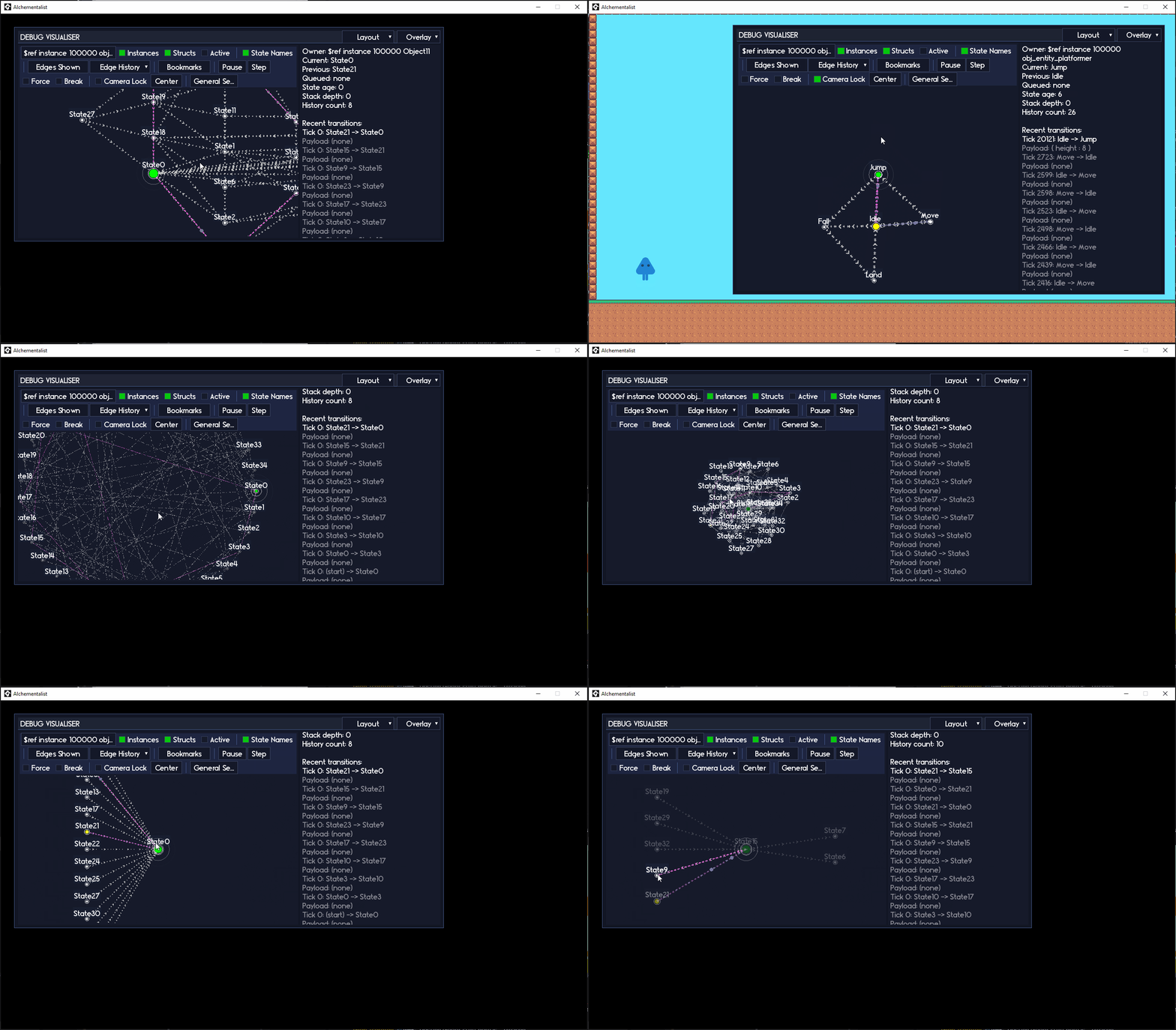
Statement comes with Statement Lens, an advanced visual debugger for your state machine!
- Interact with your state machine in real-time while you play!
- Control your state machine directly through the visual debugger!
- Inspect transitions, activity, history, timing, and more.
Statement Lens is free for all owners of Statement.
The 30 second version
If you only remember the “shape” of Statement, remember this:
- Make a machine:
state_machine = new Statement(self) - Make states:
state = new StatementState(self, "Name") - Add handlers:
state.AddEnter,state.AddUpdate,state.AddExit, optionalstate.AddDraw - Register states:
state_machine.AddState(state) - Run it:
state_machine.Update()(andstate_machine.Draw()if you want Draw handlers)
That is enough to ship a lot of games.
Features at a glance
Statement gives you:
An easy to declare Statement state machine bound to an instance or struct. Named StatementState states with inbuilt Enter / Update / Exit / Draw handlers (and it is easy to add more handlers if you want). And Chainable methods so your state setup reads cleanly:
idle_state = new StatementState(self, "Idle")
	.AddEnter(_enter_func)
	.AddUpdate(_update_func)
	.AddExit(_exit_func);
And a pile of optional “only when you need them” features:
- Queued transitions
- Declarative transitions (conditions that auto-switch)
- State stacks (Push/Pop)
- Nested submachines (host states with child machines)
- State history
- State templates (reuse handlers and transitions)
- Transition payloads
- Non interruptible states
- Pause support
- Rich introspection and debug helpers
- Per-state timers (time_source backed)
- And more
This is part of the RefresherTowel Games frameworks
Statement is part of the RefresherTowel Games suite of reusable frameworks for GameMaker. Every tool in the suite is designed to be:
- Easy to drop into a project
- Properly documented
- Feather-friendly (JSDoc annotations everywhere)
- And happy to work alongside the other tools, instead of fighting them
Check out the other frameworks currently available:
 Pulse - A signals and events framework. Broadcast “what happened”, let any number of listeners react. Includes queries (ask your game a question, anything that might want to answer responds!), tags, priorities, sender filters, queued dispatch, groups, and solid debug/introspection.
 Echo - A lightweight debug logger for filtering and prioritising messages, plus dumping logs to file without pain.
These frameworks are designed specifically to work together easily, to allow you to focus on actually making your games, rather than inventing tooling!
Statement ships with Echo (a minimalist, yet powerful, debug logging framework) for free!
Introduction
Statement replaces scattered if (state == ...) checks or giant switch statements with a simple structure:
- Each object (or struct) owns a
Statementstate machine. - Each machine has one active
StatementStateat a time. -
States can define:
Enter(runs once when entered)Update(runs when you callUpdate, usually every Step)Exit(runs once when leaving)Draw(optional, runDraw()in Draw Event for per-state drawing)
You can keep things dead simple (one state, one Update) or turn on more advanced features later without changing the basic workflow.
Basic Features (Core)
These are the features most people will use every day:
-
Owner-bound state code State handlers automatically run in the scope of the owner instance or struct. No awkward “how do I reach my object from inside this state?” problem.
-
Clear lifecycle Each state can have:
Enterfor setupUpdatefor main logicExitfor cleanupDrawfor visuals (optional)
-
Simple timing The machine tracks how long the current state has been active (scaled time units):
GetStateTime()/SetStateTime()
-
Named transitions
AddState(state)ChangeState("Name")GetStateName()
-
Payloads (optional, but very handy) Pass data when changing state, then read it back via:
GetLastTransitionData()
-
Feather-friendly The API is fully annotated for nicer autocompletion and linting.
If you are a beginner, or you just want something straightforward, you can stop here and be totally fine.
Advanced Features
These are the knobs and levers for when your project starts getting spicy:
-
Queued transitions Request a change now, apply it safely later:
QueueState()ProcessQueuedState()SetQueueAutoProcessing()
-
Declarative transitions Attach conditions to a state and let the machine decide when to switch:
AddTransition(target_name, condition, [data], [force])
-
State stack (Push / Pop) Temporary overlays like pause menus, cutscenes, modals:
PushState("Menu")PopState()- Helpers for depth, peek, clear
-
History and introspection Keep a record of where you have been and ask questions like:
- “Was I previously in state X?”
- “What was the last state?”
- “How many transitions happened recently?” Includes history limits and cleanup helpers.
-
Non interruptible states Lock a state so it cannot be interrupted until you unlock it. Great for attack windows, stagger states, short cinematics, etc. Forced transitions can override this for emergencies (like Death).
-
Pause support Freeze automatic processing with one call:
- No Update handlers
- No queued transitions
- No declarative transitions
- No state age ticking But you can still Draw and force transitions when needed.
-
Per-state timers Optional timers on each state backed by
time_source, plus a global kill helper. -
State change hook Run a callback whenever the machine changes state (logging, analytics, signals, whatever).
-
Global transition hooks Listen for any-enter / any-exit / any-transition events on a machine.
-
Custom handlers Add extra handler types beyond Enter/Update/Exit/Draw if you want to integrate with other events.
-
Debug helpers Dump state names, print history, and get compact descriptions of the machine.
You can ignore all of this until you genuinely need it. Statement is built to be comfy at the surface, but deep if you go looking.
Requirements
-
Any GameMaker version that supports:
- Struct constructors:
function Name(args) constructor { ... } method(owner, fn)time_sourceAPIs
- Struct constructors:
-
You need:
- Statement scripts
- Echo scripts (shipped free with Statement)
If you remove Echo, you can either wrap
show_debug_message()with the same function names, or replace the debug calls with your own system.
No extensions, no assets, no nonsense.
Quick Start (Core)
Minimal example: one machine, one state.
Create Event
state_machine = new Statement(self);

var _idle = new StatementState(self, "Idle")
	.AddEnter(function() {
		EchoDebugInfo("Entered Idle");
	})
	.AddUpdate(function() {
		image_angle += 1;
	});

state_machine.AddState(_idle);
Step Event
state_machine.Update();
Draw Event (optional)
state_machine.Draw();
That is it. You now have a state machine.
Always construct Statement and StatementState using new. Calling these constructors without new will silently fail and your state machine will not work.
Quick Start (with transitions and payloads)
Two states (Idle and Hurt), change with payload, read it on enter.
Create Event
state_machine = new Statement(self);

var _idle = new StatementState(self, "Idle")
	.AddUpdate(function() {
		// Idle code
	});

var _hurt = new StatementState(self, "Hurt")
	.AddEnter(function() {
		var _data = state_machine.GetLastTransitionData();
		if (is_struct(_data)) {
			EchoDebugInfo("Entered Hurt with damage: " + string(_data.damage_taken));
		}
	})
	.AddUpdate(function() {
		if (hurt_anim_finished) {
			state_machine.ChangeState("Idle");
		}
	});

state_machine
	.AddState(_idle)
	.AddState(_hurt);
On collision with enemy bullet
var _current_hp = hp;
hp -= other.damage;
var _hp_change = _current_hp - hp;

state_machine.ChangeState("Hurt", { damage_taken: _hp_change });
Help & Support
Bug reports / feature requests
The best place to report bugs and request features is GitHub Issues:
If you can, include:
- A short code snippet
- Which functions you called (
ChangeState,QueueState, etc) - Any relevant debug output (
EchoDebugInfo/Warn/Severe)
If you are not comfortable using GitHub, you can also post in the Discord and I can file an issue for you: RefresherTowel Discord
Questions / discussion / examples
Join the Discord to ask implementation questions, share patterns, and see what other users are building: RefresherTowel Discord