
Your game, mood-ified!
It’s all too easy to chuck a semi-transparent black overlay over your game when night falls and call it a day (or perhaps call it a night, lol). But is that really what you want your players to see?
What if you could adjust the actual mood of your game over the course of a day. A cold, crisp morning flows gently into a bright sunny midday, followed by an orange, warm afternoon, and a spectacular sunset, of course. Then a night with deep, rich purples.
Well Sundial is designed to give you exactly that. And best of all, you can visually author it inside GM itself.
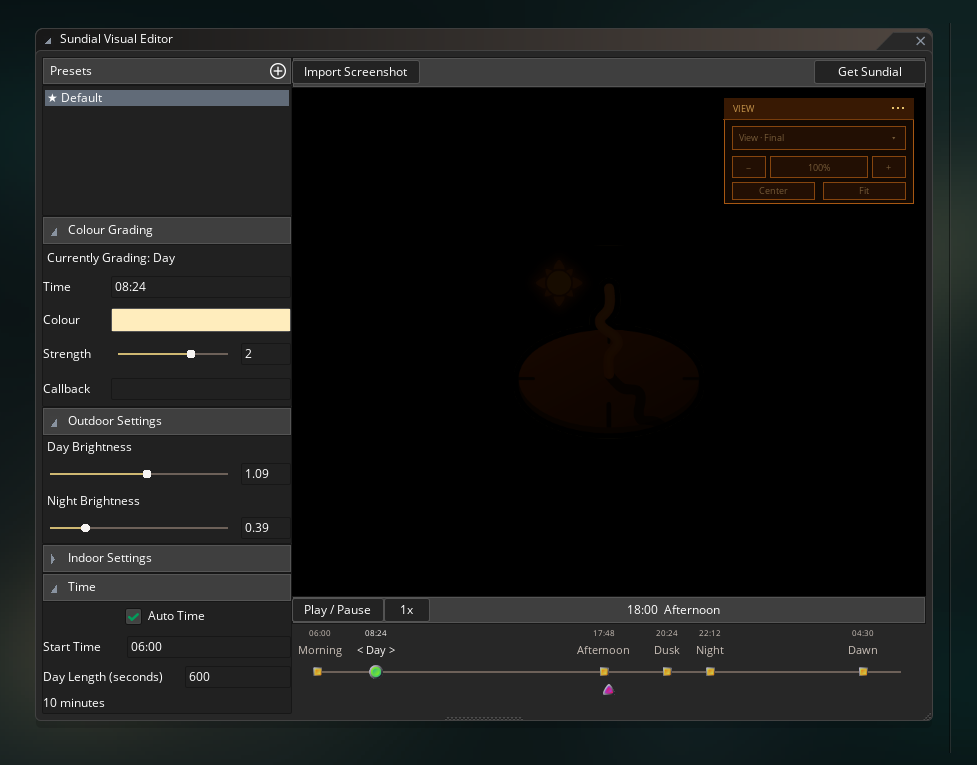 The Sundial Visual Editor
The Sundial Visual Editor is completely free to try out! Simply visit RefresherTowel Games Plugin Access for instructions on how to download and install it, then start trying it out with your game!
Sundial takes an existing 2D scene and grades it continuously through six authored parts of the day:
- Morning
- Day
- Afternoon
- Dusk
- Night
- Dawn
You choose the colour and strength of those looks, Sundial blends between them, and separate day/night brightness controls handle how light the scene should actually be. So you can give your game a stylistic mood easily.
The easiest way to author Sundial is through its GameMaker IDE plugin. Import a screenshot from your game, scrub through the day, drag the period timings around, and tune the result while looking at the actual scene you’re trying to grade.
Once you’ve authored a look, using it in-game is as simple as calling:
SundialStart();
and then when you want Sundial to stop handling the day/night cycle, it’s simply:
SundialStop();
That’s the entire code you need to get Sundial up and running, beautifying your day and night cycle!
Of course, Sundial can also be used as a pure code library, and you can take control of the creation of Sundial constructors, set or change any settings, and also manage the drawing and updating if you wish to. The above code is simply the quickest and easiest way to get Sundial running in an automated way.
Indoor and outdoor areas can react differently
Sundial also lets you alter how indoor and outdoor areas are graded, by letting you provide an “indoor mask”.
On the mask (which should be the same size as your rendering surface), anything drawn as white is considered indoors, anything drawn as black is considered outdoors, and anything greyscale is considered “inbetween” (meaning you can greyscale towards black away from your windows, for a “light spill” during night).
Indoor pixels have their own base colour, grading strength and day/night brightness. They can also inherit some of the outdoor colour through Indoor Daylight Influence, which lets a room stay recognisably indoors while still picking up some of the warmth of dusk or the coolness of night.
You don’t need the Visual Editor to use Sundial
While the Visual Editor plugin makes it incredibly easy to create the exact moods you want, Sundial also has code equivalents for every change you can make in the plugin. So you can build Sundial entirely in code (if that’s your weird little preference):
sundial = new Sundial()
    .SetGrading(eSundialPeriod.MORNING, make_color_rgb(194, 242, 229))
    .SetGradingStrength(eSundialPeriod.MORNING, 2)
    .SetBrightness(1.09, 0.39)
    .SetTime(6);
Every setting the importer applies goes through the same public Sundial API available to your own code. The editor is simply a visual authoring layer over that runtime.
That also means disabling or uninstalling the IDE plugin won’t suddenly break your projects using Sundial. The GML runtime and the compiled preset data live in the project itself.
In-Game Control
Sundial also gives you plenty of procedural control while your game is running. You can set times directly, skip ahead, reverse time, and so on.
You can check the amount of sunlight there currently is (independently of what the actual phase of day or colour grading is), you can set explicit callbacks that run when each milestone is reached during the day (i.e. have a function that turns all streetlights on when Dusk arrives, etc).
And you can also set all the same grading/brightness/etc controls through code as you can through the Visual Editor plugin.
Where to go next
Start with Using the Visual Editor Plugin. That’s the magic sauce of Sundial and the quickest way to get Sundial tuned to perfection for your game.
Then move to Using Sundial for importing presets and drawing them in-game. Time, Periods & Callbacks covers the clock, automatic time progression and gameplay reactions to Morning, Dusk, Night and the other authored periods.
If your game needs interiors, Indoor & Outdoor Grading explains the mask and the separate indoor controls.
Finally, Configuring Sundial in Code covers the full code-only setup for projects that don’t want to use the Visual Editor plugin at all.
Requirements
Sundial requires a GameMaker version with support for:
- struct constructors;
method();- the array and struct functions used by the library.
The Sundial runtime works without the IDE plugin. Visual preset authoring through Tools > Sundial additionally requires a GameMaker version that supports native IDE plugins.
Help & Support
Bug reports and feature requests
The best place to report bugs or request features is GitHub Issues:
If you're reporting a problem, a small reproduction or code snippet and the relevant Sundial calls usually make it much easier to track down.
Other Cool Stuff
If you like Sundial, be sure to check out my other libraries:

Statement
An easy-to-use state manager with a wide range of tools for structuring game state.

Pulse
A signals and queries manager that helps uncouple dependencies and simplify communication between your game systems.

Catalyst
A powerful stat manager for building values such as attack power, movement speed, health, or anything else that needs to be modified and recalculated as the game changes.

Whisper
A narrative manager for building reactive storytelling from small pieces of authored content and the rules that decide when each piece is relevant.

Fate
A weighted roll library for building everything from simple random choices to nested, policy-driven reward and selection systems.

Quill
A free advanced text box system with text selection, right-click context menus, cut/copy/paste, single-line and multi-line editing, and extensive customisation.

Echo
A lightweight debug logger with levels, tags, history, raw capture, and file dumps. Echo ships together with Echo Chamber and Echo Console.